> For the complete documentation index, see [llms.txt](https://docs.camflite.com/llms.txt). Markdown versions of documentation pages are available by appending `.md` to page URLs; this page is available as [Markdown](https://docs.camflite.com/crd1/crd1-intro/overview/ndaa-controller.md).
# NDAA Controller
**Features**
Atlas Controller is a compact, lightweight, IP-rated mobile industrial handheld ground control unit. It includes a powerful computer, broadband datalink, HD Video transmission, LTE connectivity, touchscreen, and much more.
**Processor and Memory**
| Parameter | Value |
| --------- | ------------------- |
| CPU | Octa Core, 2.7GHz |
| RAM | 4GB |
| ROM | 64GB |
| External | MicroSD (Up to 1TB) |
**Radio**
| Parameter | Value |
| ---------- | ----------------- |
| Technology | 2x2 MIMO |
| Frequency | 2402 - 2482 MHz |
| Power | up to 30 dBm / 1W |
| Bandwidth | 4 / 8 MHz |
| Encryption | AES-256 |
| Data rate | 25 Mbps |
**Environment**
| Parameter | Value |
| ------------------- | ----------- |
| Resistance | IP-68 |
| Ambient temperature | -40...+50°C |
**Screen**
| Parameter | Value |
| ---------- | ------------------- |
| Size | 8" |
| Resolution | 1920 x 1200 (WUXGA) |
**Size & Weight**
| Parameter | Value |
| ---------- | ------------- |
| Dimensions | 286x166x57 mm |
| Weight | 1140 g |
**Battery**
| Parameter | Value |
| ---------------- | ------------------------ |
| Type | Li-Ion, fully integrated |
| Capacity | 5050 mAh |
| Charge current | 4A |
| Charge interface | USB Type C |
### Power up ATLAS Controller
* Open the Pelican case and remove the ATLAS Controller
* Make sure that the antennas are mounted properly
**WARNING**
Do not power on the radio module without antennas. It may significantly reduce the quality of the radio or damage the radio module permanently.
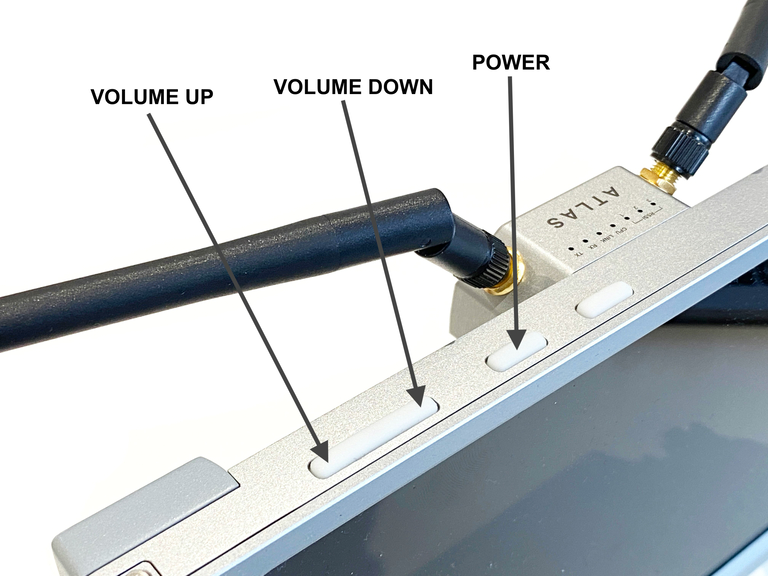
* Press the Power button for a second until the unit starts to power up. The boot-up process usually takes 15 seconds.
* After ATLAS is loaded up, ensure the WiFi is disabled for Ethernet to work correctly.
* If you wish to use radio connectivity, please press the power button on the radio module:
* Make sure that radio module status LEDs are blinking / solid:
**Start the Application**
Once ATLAS Handheld is loaded you can start the ground control station app. Click on AMC app on the main screen or apps menu.
### Power Off
* Close the ground control station app by returning to the main screen or pressing the home button.
* Press the Power button on the radio module to turn off the radio:
* On the controller’s homepage, use the drop-down menu on the top right of the screen to select the “Power Off” button or press the VOLUME DOWN and POWER buttons for the power off menu.
### Charging
Plug in the USB Type C cable to the USB port as shown in the image below:
{% hint style="warning" %}
The controller should not be left in a hot vehicle or operated in direct sunlight. On hot days, keep the controller from getting hot, as this can prevent a stable connection to the drone.
{% endhint %}
{% hint style="info" %}
Keeping the controller charged at about 40% will ensure long-range use. Use an external battery supply to keep the controller charged during operation.
{% endhint %}
## TroubleshootingSome troubleshooting guidance which will help to resolve the questions quickly.
| Problem | Solution |
| ----------------------------------- | ---------------------------------------------------------------------------------------------------------------------------------------------------- |
| Unit doesn't turn on | Make sure that the unit is charged. Connect the charger and try to power up the unit again. |
| Drone telemetry is not connecting | Make sure that your radio module is turned on the modules are paired. |
| Air module is not paired with ATLAS | Press and hold ATLAS reset button for 6 seconds. Press and hold Air module reset button for 11 seconds. After 30 seconds the modules will be paired. |
| I can't download the maps | Internet connection is required to download the maps. Make sure that you have active WiFi or LTE connection on ATLAS. |
| Not charging | If the tablet is not turned off properly and is allowed to fully discharge, it can take several hours for the charger to regain a charge. |
| Connection Issues | Most connection issues are related to the battery state of charge; under the 40% range, it can be reduced. Closing AMC will cause he drone to RTL. |
.avif)
.avif)
.avif)